Data modeling for Snowflake, inside Snowflake
Declare the grain. Ship the tables.
Grain is an entity-relationship modeler built for Snowflake warehouses. Design dimensional and Data Vault models on a diagram, compare them with what is really in Snowflake, and deploy only the statements you have read. Install it from Snowflake Marketplace and it runs entirely inside your own account.
er-model/entities/fact_order_line.ymlname: fact_order_line
pattern: transaction-fact
grain: One row per order line
attributes:
  - name: order_line_key
    type: NUMBER
    primaryKey: true
  - name: line_amount
    type: NUMBER(18,2)
    lexicon: amount
    notNull: true
The problem
Most warehouses are modeled twice, and the two never agree.
There is the diagram someone drew at the start, and the DDL that actually ran. Within a quarter they drift apart, and the glossary lives in a third place nobody links to. Grain keeps one model, checks it against Snowflake, and keeps the business meaning attached to the columns.
The diagram stops matching production
Grain reads the live schema and lists every difference column by column: missing tables, type changes, NOT NULL, keys. You choose, per difference, whether the design or Snowflake is right.
DDL goes out without a real review
Grain writes CREATE for new tables and ALTER for existing ones, flags anything destructive, and refuses type changes Snowflake can't make safely. Nothing runs until each statement is ticked.
Definitions live somewhere else
Link columns to approved business attributes with a classification (PII, Confidential, Internal, Public), then push that classification to Snowflake as tags.
How it works
From scope to deployed tables, in one tool.
The order below is how most teams use Grain on a new subject area. You can enter at any step, for example by reading an existing Snowflake schema first.
Scope the warehouse
A context diagram shows which source systems feed which subject areas, and who consumes them. Mark anything out of scope before anyone draws a table.
Design the model
Each subject area has conceptual, logical and physical views. Start an entity from a template such as SCD Type 2 or Accumulating Snapshot Fact, and it arrives with the right keys and housekeeping columns. Or describe the business in plain language and let Design from requirements produce entities in third normal form.
Compare with Snowflake
Read Snowflake is read-only. It brings in databases, schemas, tables, columns, keys, defaults and view queries, then shows how the design differs from what's deployed.
Deploy what you approved
Generate DDL previews the script without running anything. Deploy runs it in dependency order, asks you to acknowledge each destructive statement, and stops at the first failure with a list of what ran.
Govern and document
Link columns to the glossary, apply
DATA_CLASSIFICATIONandBUSINESS_ATTRIBUTEtags, and export a data dictionary, dbtschema.yml, or a Cortex Analyst semantic model.Work on it together
The whole team edits one model inside Snowflake, and every edit is attributed to the signed-in user. Download it as plain YAML at any time to review in a pull request or keep in Git, and import it back.
One logical model, many layers
Relational, lake and one big table, from one design.
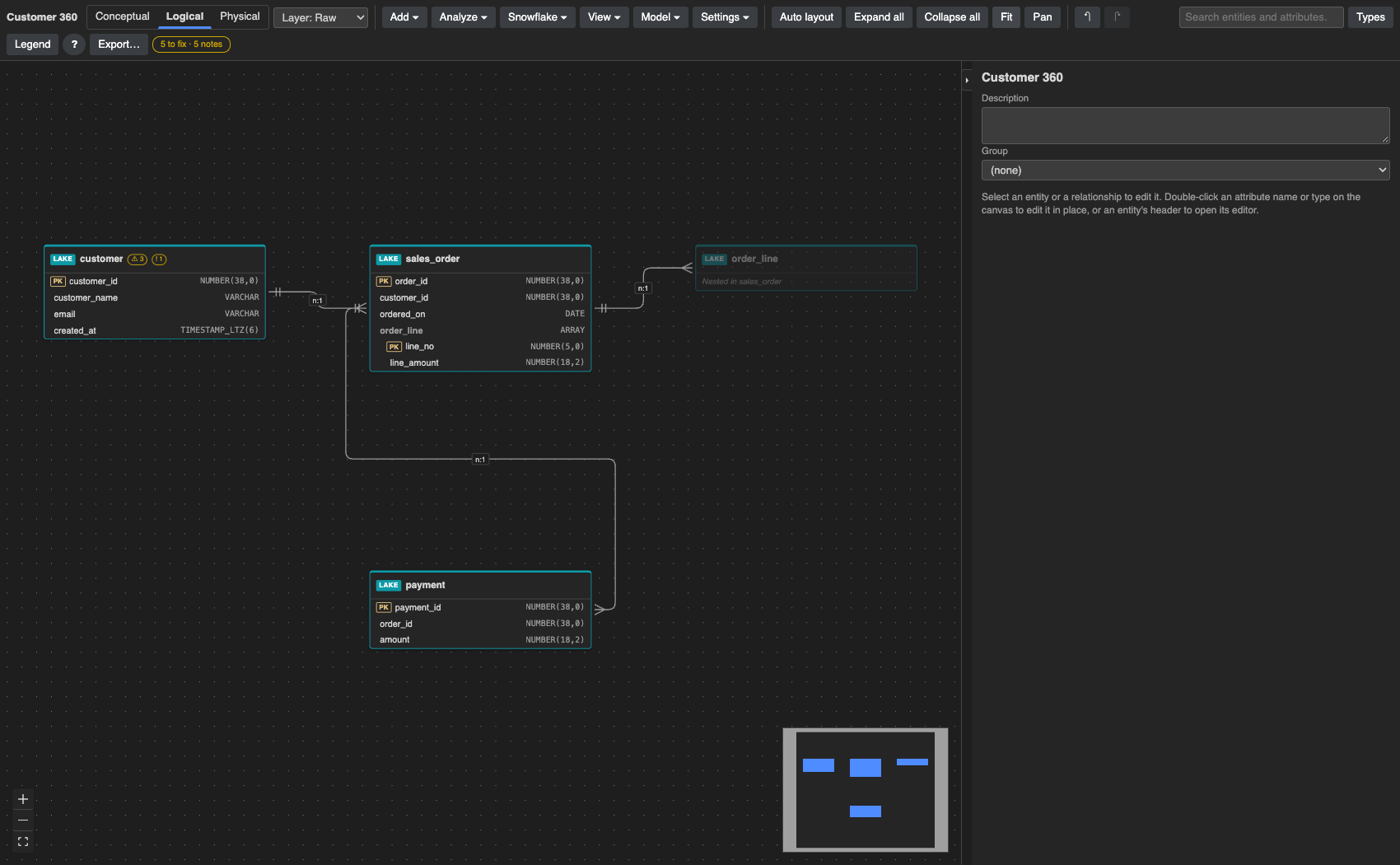
Model the business once. Grain stores it as normalized tables, as Iceberg or VARIANT tables in the lake with child rows nested in their parents, and as wide one-big-tables at the grain you choose. Add loyalty_tier to customer and every layer picks it up.
Where a join would multiply rows, Grain makes you choose: aggregate, array or exclude. A one big table never silently duplicates or drops rows.
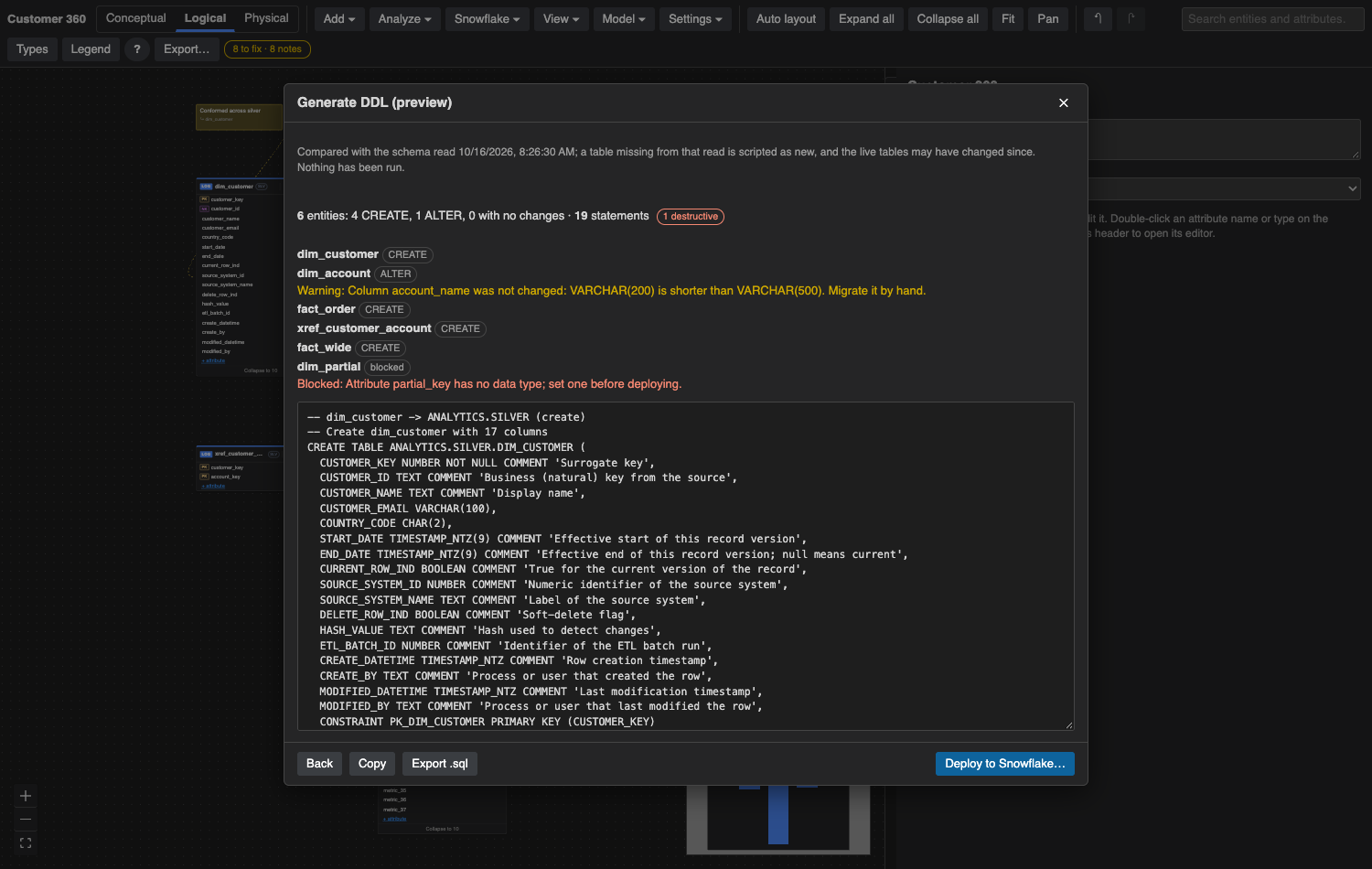
Deploy you can read
A plan, a warning, and a block, before anything runs.
The preview counts CREATE, ALTER and unchanged tables and marks destructive statements. It warns when a change would shrink a column, and blocks an entity that isn't ready, such as an attribute with no data type.
Compare against the live tables, the schema you last read, or nothing at all. Export the script as .sql for your own pipeline if you prefer.
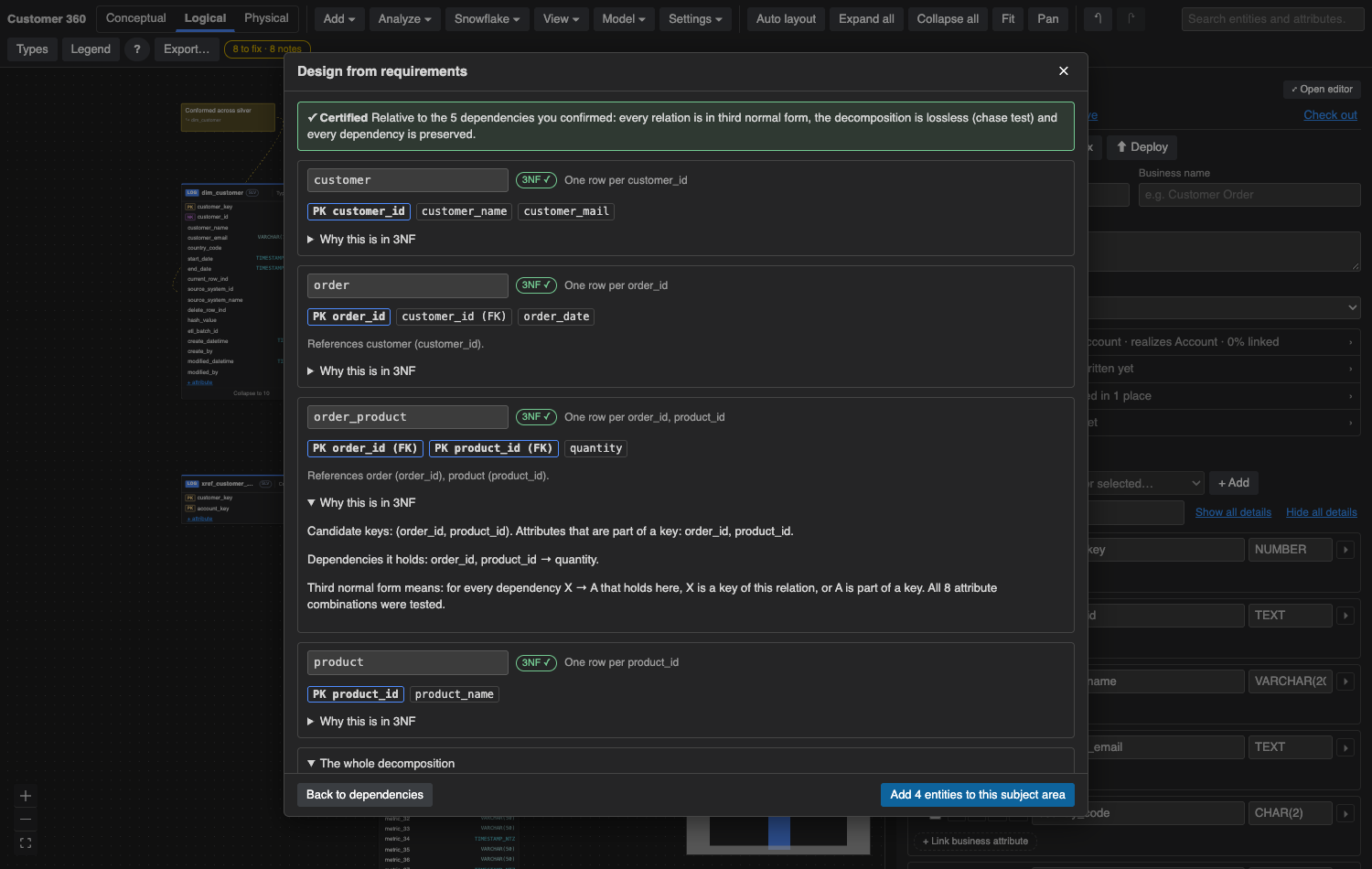
Design from requirements
Third normal form you can check, not just trust.
Describe the business. Cortex lists the data items and what determines what, each with the sentence it came from. You confirm or correct them. Then Grain itself, not the language model, computes the entities and proves each one is in 3NF, that the join is lossless, and that every dependency is preserved.
The guarantee is stated honestly: it holds relative to the dependencies you confirmed.
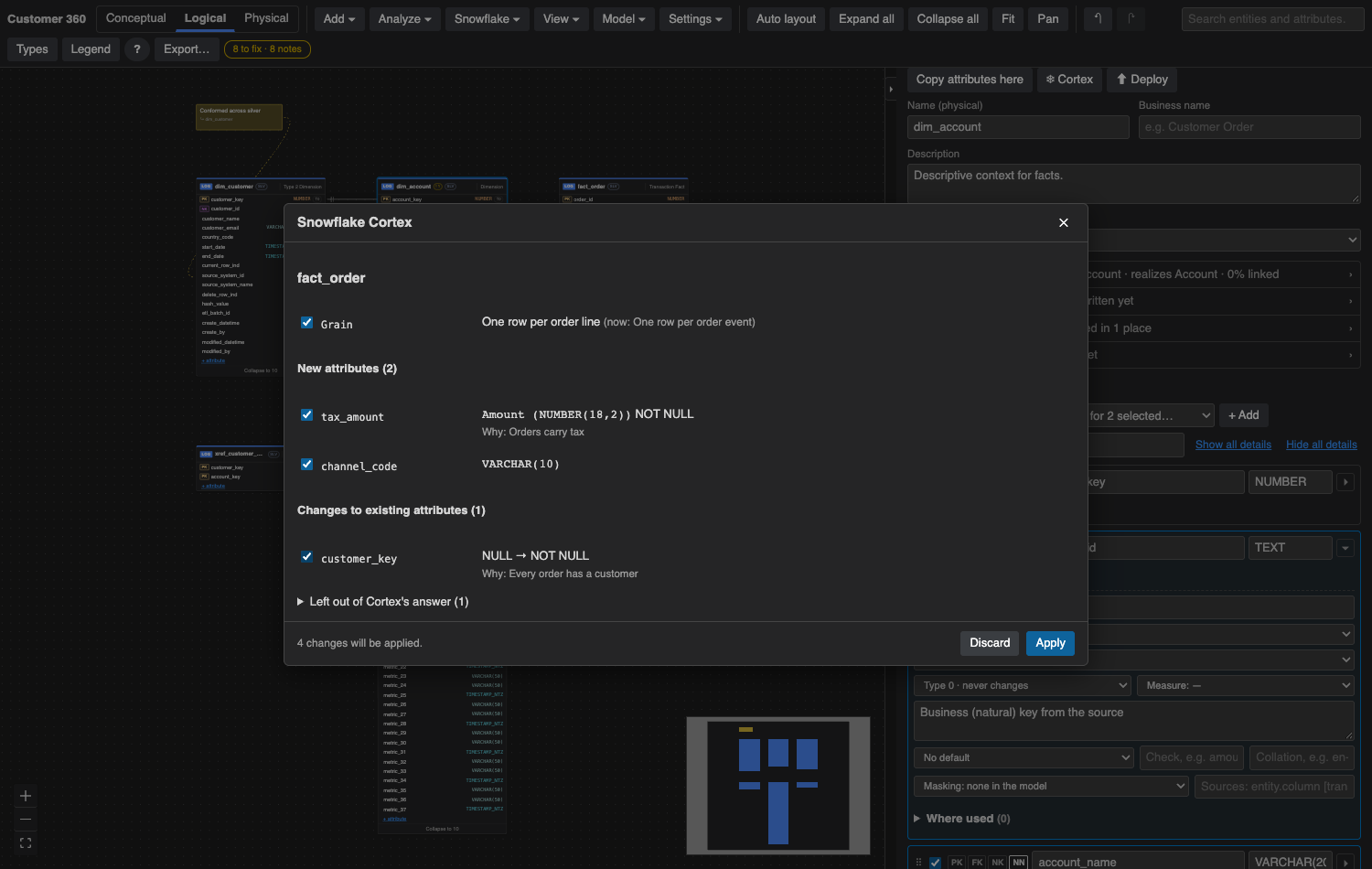
Cortex as a modeling assistant
Suggestions arrive ticked, with a reason. You decide.
Ask Snowflake Cortex to complete an entity's design, review it, or draft its descriptions. It proposes attributes, types from your lexicons, NOT NULL and a grain. Untick what you don't want and apply the rest as one undoable step.
Anything that breaks your naming rules is listed, not quietly dropped. Cortex runs in your own Snowflake account, and it never sees rows from your tables.
Who it's for
Built for the people who own the warehouse design.
Data architects
Standards that hold: design patterns with their required columns, a naming standard that turns business names into physical ones, lexicons for repeated types, and 24 configurable health rules.
Analytics engineers
A model that lives next to your dbt project, generates schema.yml, and deploys straight to Snowflake when you want it to. All in the browser, opened from Snowsight.
Governance leads
A glossary with Draft, In review and Approved states, classification on every linked column, review and check-out on entities, and a record of why each design decision was made.
Delivered through Snowflake Marketplace
Install it like any other Snowflake app.
Grain is a Snowflake Native App. It runs in a small container inside your own account, your people open it from Snowsight, and it is billed through your Snowflake invoice.
Install from the listing
An account administrator gets Grain from Snowflake Marketplace. There is nothing to download and nothing to install on anyone's machine.
Choose what it can reach
Grant the databases it may read and, if you want, deploy to. Grain always acts as the signed-in user, so it can never do more than that person's role allows.
Give your modelers the app role
They open Grain from Snowsight and work on one shared model. You can download it as YAML at any time, so the model is never locked in.
Early access
Bring one subject area. We'll model it with you in the first session.
We're onboarding a small number of Snowflake teams. Tell us about your warehouse and we'll set you up with the app in your account and a guided first model.